
Description
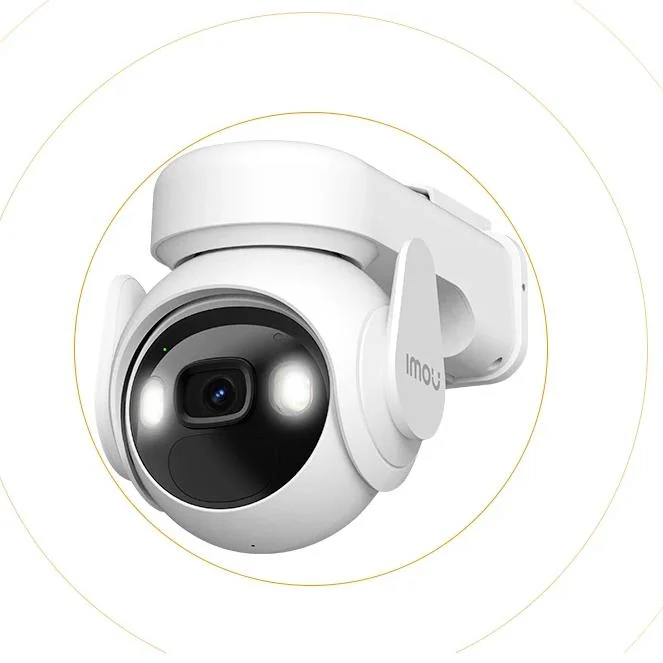
The 3MP Cell PT Lite is a wireless surveillance device powered by a solar panel. It features a high-quality 3-megapixel camera that captures clear, detailed images and video footage. This WiFi-enabled security camera is completely wire-free, making it remarkably portable and flexible in placement.
The camera is equipped with a substantial 5000mAh battery, providing it longevity and reliability. Alongside its solar panel feature, this ensures an extremely efficient, self-sustaining power source, minimising interruption in its operation and negating the necessity for regular charging.
Notably, the device includes an IP66 rating, rendering it resistant to dust and water. Hence, the camera is suitable for both indoor and outdoor usage, offering durability against various weather conditions and environments.
One key distinctive feature is its auto-tracking function, which uses motion detection to automatically follow movement within its field of vision. This gives the device the capacity to provide a more dynamic monitoring rather than just fixed-view coverage.
In sum, the 3MP Cell PT Lite with Solar Panel offers an innovative, sustainable and incredibly versatile option for those seeking to enhance the security of their homes. The combination of advanced features puts this camera at the forefront of contemporary home surveillance technology.
Cell PT Lite With Solar Panel
Endless Power, Endless Protection 3MP QHD Video | 100% Wire-Free
| 5000mAh Rechargeable Battery
Siren & Spotlight | PIR+Human Detection | Low-Battery Notifications
Two-way Talk | Auto Tracking | Type-C
IP66 | Flexible and Secure Storage | Works with Solar Panel See the world in 2K
Cell PT delivers 2K QHD high resolution so you wont miss a single detail. 5000mAh battery and USB-C fast charging
The 5000mAh capacity battery allows for long hours of continuous operation and comes with a USB-C port for fast charging. Endless protection with solar panel
The Cell PT can also be connected to a solar panel for unlimited² battery life to keep your security system running 24/7. Quick installation with just one hand
With a simple push of one hand, your Cell PT is now installed, and it only takes one click to take it off. Panoramic pan & tilt for 360° protection
Cell PT supports 0°-355° pan and 0°-90° tilt to fully protect your home with a 360-degree view. Light the night up with smartness
Cell PT can adjust different night vision modes according to your needs, whether you want the night vision to remain in full color all the time or want to turn on full color only when there is an event to save energy, it can always satisfy you.
Smart mode
The camera will automatically turn into color mode from infrared mode when suspicious motion is detected.
Full-color mode
Thanks to the built-in spotlights, your night vision is now turned up and in full color.
Infrared mode
Advanced IR algorithm provide clear black-and-white pictures even in darkness.
Off mode
Turn off all night vision modes Infrared and spotlights are all turned off. More efficient PIR human detection
Cell PT will activate the video algorithm for person detection when motion is detected, ensuring efficient detection and long battery life. Stay on target
The detection algorithm of Cell PT continuously tracks moving objects in the frame, keeping the target in the frame at all times. Professional protection to weather any storm
With IP66 water-resistance, Cell PT is able to against dust penetration and can easily handle rain and wind, keeping you safe around the clock. Different working modes to suit your needs
The Cell PT supports 5 different operating modes, whether you want to have a long battery life or continuously record video, you can set it through the app. Fully customize your security
With IMOU Life App, you can set up different security options, such as setting the detection sensitivity, alarm tone, setup time, etc. to make security work for you. Protect according to your preferences
Favorite Point Setting
Customizable detection zone
Customizable Alarm Sound
Protection Scheduling Deter unwelcome visitors
Cell PT keeps an eye on your house, when someone breaks in, the 120dB siren will turn on to deter the unwelcome visitor. Interact in real-time
A built-in speaker and a microphone with the echo cancellation feature allow you to interact with family from anywhere. Work with Smart Home Platform
Imou life/Alexa Product Details Whats in the box?
1x Camera
1x Quick Start Guide
1x Power Cable(1m)
1x Mouting Bracket
1x Screw Positioning Stickers
1x Screw and Wall Anchor pack
1x Solar Panel
-1x Locking Screw Cap
-3x Wall Anchors
-1x Unversal Joint
-1x Base
-1x Quick Start Guide
-1x Circular Socket Nut
-4 Screws
Operating with Imou Life App FAQ
Q: Difference between SD memory card and cloud storage?
A:
1) Using SD card need to use computer to read the history monitoring screen, when the memory card is full, it will automatically delete and start a new round of recording, make sure to save the data in time;
2) Cloud storage is a value-added service, new devices have a 7-day free trial period of cloud storage, you can view the history monitoring screen directly in the app. When the trial period is over, you can choose to subscribe in the app. There is a time limit for using this service, when the time is full of 3 days or 7 days, the records will be automatically deleted and start a new round, make sure to save the data in time.
Q: How to modify devices photo /name /channel name /password in mobile app?
A: Two methods to modify device infos from your account,firstly login into your account in mobile app:
Method 1: Go to preview page then click icon on the top right corner, go to device settings page,click device image bar to Device Info page,click corresponding option to modify.
Method 2: Click Me->My Device->select corresponding device ->click device image bar to Device info page -> click corresponding option to modify.
Q: The app saysFailed to bind?
A: When the app says Failed to bind, it means your device is already successfully connected to your Wi-Fi, but failed to add the device to your Imou account. Please double check whether your router is connected to Internet, then try again. Normally the reason is the Internet connection is not stable.
Q: Imou account?
For security reason, one camera can be bound to only one Imou account. So if you want to add your camera to a new account, please delete it from the previous account first.
A: Two methods to delete camera from your account,firstly login into your account in mobile app:
(1) Method 1:go to preview page then click gear icon on the top right corner, go to device settings page, slide to the bottom then delete device.
(2) Method 2:Click Me->My Device->select corresponding device ->slide to the bottom ->Delete Device.
Q: I changed my Wi-Fi, I want to put the camera at a new location, how to connect my camera to my new Wi-Fi?
A:
1Firstly please check whether your camera has an Ethernet port and whether you have an Ethernet cable at hand.
2If yes, please power on your camera and connect it to your Router with the Ethernet cable, wait till the LED turn stably blue to make sure it has access to Internet. Then login to your Imou account, find your IPC on Device page and go to its settings page, then tap Wi-Fi Config and you can connect it to your new Wi-Fi.
3If your camera has no Ethernet port or you dont have a cable at hand, we suggest you reset your camera to factory default, then setup your camera with the new Wi-Fi.
Q: How can I receive the alarm message?
A:
1Firstly, you need click the enable button in the upper right corner in the picture of the channel of main page.
2If it says Failed to subscribe, we suggest you ensure the following configuration:
Receives notifications from APP. Enable Imou Notifications via Settings-> Notifications on your iPhone and Me-> Settings-> Notice on Imou APP.
3Enable Event in the device. Take motion detection as an example, the event should be enable and time schedule should be valid.
4Make sure the device is connected to Internet.
5After successfully subscribe, you will receive the message.
Q: Working at night, the image is all black
A: Reason:
1IR LED didnt light up
2ICR didnt switch to night mode
3Objects are too far away from the camera
Solution:
If the IR LED did light up, but you cannot hear KA and the image is still all black, maybe there is something wrong with the ICR.
For consumer cameras, the IR distance is less than 10m(differ between different models), so you cannot see too far away at night.
About IMOU

Reviews
There are no reviews yet.